|
Poslao: 30 Mar 2015 18:43
|
offline
- marinamaroon 2

- Novi MyCity građanin
- Pridružio: 25 Jan 2015
- Poruke: 2
|
Cao svima, ja sam Marina. Relativno sam nova u ovoj prici i treba mi mala pomoc.
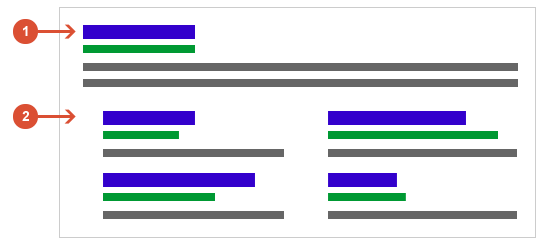
Pravim neki sajt i zanima me kako kad ga okacim da mi ga google prikaze kao na ovom sajtu sa slike [Link mogu videti samo ulogovani korisnici] (testovi, cenovnik, kontakt, itd.) Bilo bi sjajno ako bih dobila neki tutorijal ili bar neki naziv pod kojim bih potrazila na yt.
Hvala unapred!
Pouz!
|
|
|
|
|
Registruj se da bi učestvovao u diskusiji. Registrovanim korisnicima se NE prikazuju reklame unutar poruka.
|
|
|
Poslao: 30 Mar 2015 22:07
|
offline
- Dr.Cooler
- Građanin
- Pridružio: 18 Jun 2014
- Poruke: 178
|
Napisano: 30 Mar 2015 22:05
Dobrodosla na MyCity,
Sto se tice teme skoro som negde citao kako to namestiti i mislim da je ceo fazon u Google+ nalogu. Valjda se preko nekih "META" tagova doda Google+ nalog u HTML sajta, a onda ga prilikom sledeceg indexiranja Google poveye i sa Google+ nalogom u pretrazi.
Evo i CP iz tog clanka:
Rel-Author– This is a meta tag that can be implemented that specifies who the author of a piece of content is and uses Google+ to identify them. Initially Google rolled this out as just a tag that you place in the <head> of the code, but ultimately they would realize it’s not realistic that authors will have that type of control over the page and expanded to a more modular form.Format:For the version that goes in the <head> tag, you use the following:
<link rel=”author” href=”https://plus.google.com/[YOUR PERSONAL G+ PROFILE HERE]“/>
For the more modular version you would emulate XFN’s rel-me and place the link directly on the page. I’ve got to admit this is a great link building strategy.
<a href=”[profile_url]?rel=author”>Google</a>
If you use this method you will have to take the second step in verification by linking to your content from your Google+ profile. For more information see Google’s explanation.
Rel-Me – Rel-me is just the XFNversion of rel-author. You simply place the meta tag on a link back to your Google+ profile.Format:
<a href=”https://plus.google.com/[YOUR PERSONAL G+ PROFILE NUMBER]” rel=”me”>Me on Google+</a>
Rel-Publisher –Rel-publisher is for business entities to claim ownership of their content. This can be used in context with rel-author or in place of it, but you should be pointing to a business profile on Google+ rather than an individuals.Format:<link rel=”publisher” href=”https://plus.google.com/[YOUR BUSINESS G+ PROFILE HERE]“/>
Ti meta tagovi ce omoguciti Google-u da poveze sajt sa G+ nalogom i prikaze ga kao na slici koju si okacila. Pozdrav 
Dopuna: 30 Mar 2015 22:07
A ako hoces da se vise pozabavis SEO-m pogledaj ceo clanak iz kog sam preuzeo gornji tutorial: [Link mogu videti samo ulogovani korisnici]
|
|
|
|
|
|
|
Poslao: 30 Apr 2015 14:21
|
offline
- Igor81
- Novi MyCity građanin
- Pridružio: 23 Feb 2015
- Poruke: 7
|
To na slici se zove rich snippet, prvo je potrebno da napravis Google+ privatni nalog za autorship (ime prezime) a zatim sa tog naloga kreiras Google my business stranicu kompanije i dodas je u meta tag web stranice.
Evo jedan primer u praksi link
<link rel="publisher" href="ovde ide link G+ kompanije" />
<link rel="author" href="ovde ide link ka vlasnickom profilu" />
Na Google my business stranici dodaj radno vreme, delatnost, slike, logo i td i to ce Google algoritam da izbacije u rich snippet-u.
|
|
|
|
|
|
|
Poslao: 10 Jul 2015 23:23
|
offline
- Pridružio: 10 Jul 2015
- Poruke: 35
- Gde živiš: Beograd
|
Potrebni su ti dodatni linkovi?
[Link mogu videti samo ulogovani korisnici]
|
|
|
|
|
|
|
|










